Version 2.0 — device-adaptive engine

AI upscaling,
tuned to your hardware.

Pro Edges profiles your GPU, VRAM and CPU at launch, then selects the optimal model from a curated library of 30+ engines — Real-ESRGAN, SwinIR, RGT, NAFNet and more. Photos, anime and video, up to 4× sharper. Processing never leaves your machine.

Windows 10/11 · NVIDIA · AMD · Intel · CPU fallback · No account required

Pro Edges vacation_photo.jpg RTX 4060 · 8 GB · DirectML
Upscaled result preview
4.0× · UltraSharp V2
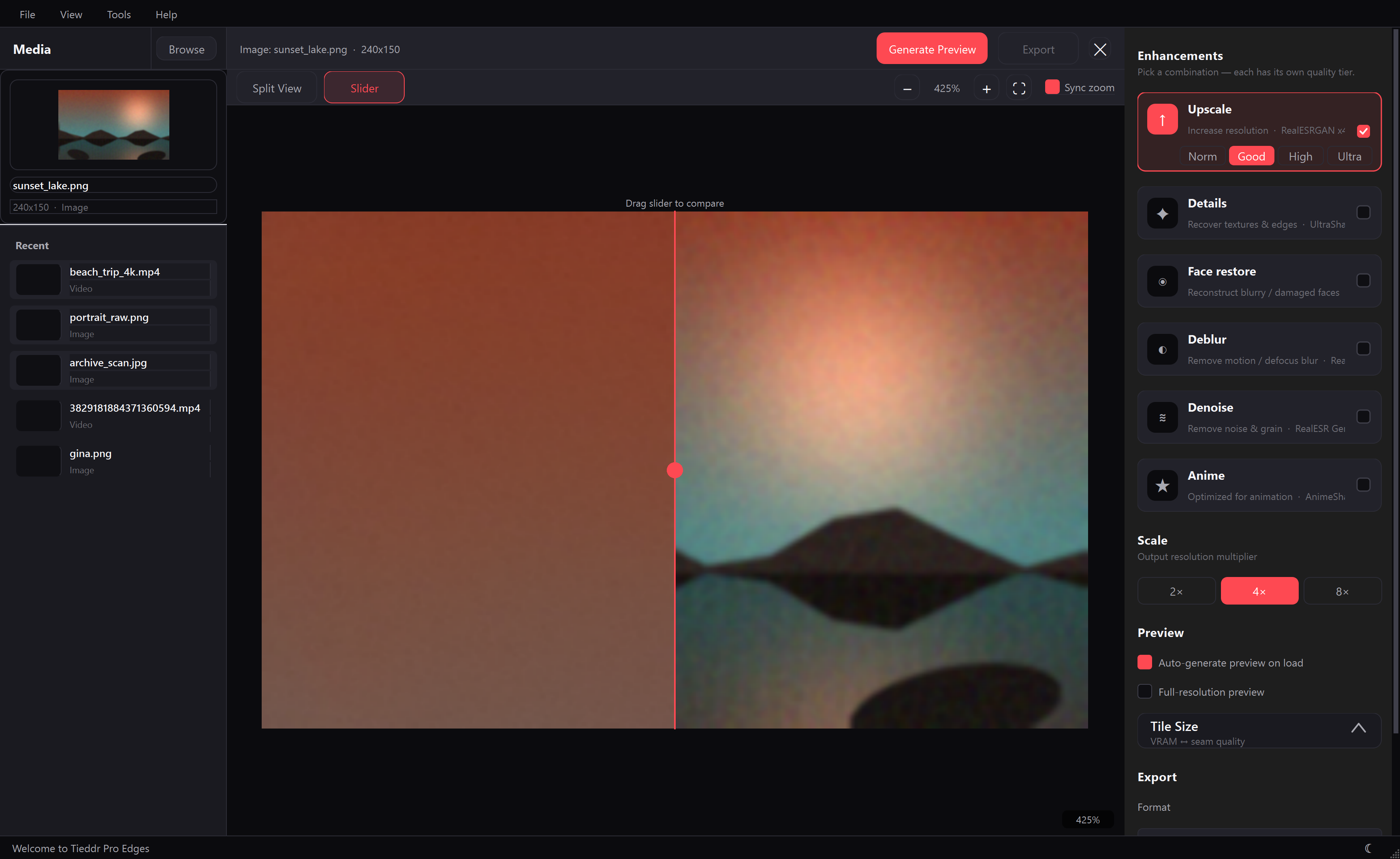
Application interface · recommendations computed from the detected hardware profile
30+curated models
4–16×resolution gain
3GPU vendors supported
100%local processing

Output quality

Produced by the shipping engine.

A 150×100 degraded input restored to 600×400 with Real-ESRGAN x4plus — the same models and pipeline included in the application.

Input: low-resolution degraded image
Output: AI-upscaled result
Input · 150×100
Output · 600×400 · 4×

Capabilities

A complete upscaling toolkit.

Photo upscaling

2×, 4× and chained multi-pass scaling with GAN-sharpness or PSNR-fidelity models. JPEG artifacts, noise and blur repaired in one pass.

Video pipelines

Frame-accurate batch processing through FFmpeg. H.264, ProRes, VP9 or PNG-sequence output at full upscaled resolution, audio preserved.

Restoration modes

Dedicated denoise (NAFNet, SCUNet), deblur (MAXIM) and face restoration (GFPGAN, CodeFormer) stages, chainable in canonical order.

Any-GPU acceleration

CUDA for NVIDIA, DirectML for AMD and Intel, CoreML on Apple silicon, and tile sizes tuned to available VRAM everywhere else.

Fully local by design

No accounts, no telemetry, no cloud rendering. Models are fetched once from open repositories; inference runs entirely offline.

Batch processing

Drop entire folders into a managed queue. The scheduler keeps the GPU saturated and recovers cleanly from interruptions.

The smart engine

Pick an outcome.
The engine picks the model.

At launch, Pro Edges builds a hardware fingerprint: GPU vendor, exact VRAM (read from the driver registry, so cards above 4 GB report correctly), free memory, CPU cores and system RAM. Every recommendation is re-ranked against that profile — heavy transformer models only appear on machines that can run them efficiently.

  • NVIDIA CUDA — unlocks FP16 execution and flagship SwinIR / RGT models
  • AMD · Intel DirectML — CNN architectures selected for shader throughput
  • Laptops, 2–4 GB VRAM — SPAN, ClearReality and AnimeVideo v3 stay responsive
  • CPU-only systems — a lightweight stack that still outperforms bicubic clearly
CPUno usable GPU
Low< 4 GB VRAM
Medium4–8 GB
High8 GB+
Hardware scan — detected at launch
$ proedges --scan

gpu_vendor      NVIDIA
gpu_name        NVIDIA GeForce RTX 4060
vram_total      8.0 GB
vram_free       7.6 GB
backend         DirectML
cpu             12th Gen Intel i7-12700F · 20 threads
ram             31.8 GB
score           63 / 100
tier            HIGH

recommended     UltraSharp V2     quality 8.5
alt_fast        SPAN 4x           speed   9.0
alt_max         SwinIR 4x GAN     quality 9.5
This exact scan powers the Recommended badges in the application — nothing is hardcoded per device.

Model library

Thirty-plus engines. Curated, not dumped.

Each model carries quality and speed ratings plus hardware-fit metadata. The headliners:

ModelBest forScaleQualitySpeedMin VRAM
SwinIR 4x GANFlagship photo detail9.54.56 GB
RGT x4Texture-preserving upscale9.03.04 GB
UltraSharp V2All-round crispness8.56.52 GB
Real-ESRGAN x4+Damaged, compressed photos8.06.02 GB
NAFNet SIDDHeavy noise removal9.55.08 GB
MAXIM DeblurMotion-blurred shots9.04.06 GB
CodeFormerFace restoration8.54.04 GB
SPAN 4xFast quality upscale7.59.02 GB
AnimeVideo v3Anime frames, realtime rates7.59.01 GB

Also included: GFPGAN, Swin2SR, SCUNet ×2, Real-CUGAN, NMKD-Siax, ArtClarity, NomosWebPhoto ATD, ClearReality and more. Models download on demand, typically 2–500 MB.

Workflow

Three steps. No timeline wrangling.

01

Import

Drag images or video files onto the window. Queue as many as you like.

02

Configure

Select modes — Upscale, Denoise, Deblur, Detail, Anime. Quality presets map onto your hardware tier automatically.

03

Export

Review with the comparison view, then export PNG, WebP, JPEG, MP4, ProRes or PNG sequences.

Install Pro Edges

Free. Windows 10/11 · Python 3.10+ · FFmpeg recommended for video.

  1. Run ProEdges-Setup.bat and follow the prompts — it installs to your user directory, no admin rights needed.
  2. Launch from the Desktop shortcut. The engine detects your GPU on first start.
  3. Models matching your hardware download inside the app when first used.

The setup wizard is the official distribution channel and is verified on every release.

FAQ

Questions, answered.

Is my data ever uploaded?

No. All inference runs locally through ONNX Runtime or PyTorch on your own GPU or CPU. The application's only outbound connection fetches open-weight model files from their public repositories when you request a new model.

How does device-adaptive selection work?

On startup the engine profiles your machine: GPU vendor, total and free VRAM (read from the driver registry, so cards above 4 GB report correctly), backend availability (CUDA / DirectML / CoreML), CPU cores and system RAM. Each model carries quality, speed, architecture and VRAM metadata. Recommendations combine curated preference order with a hardware-fit penalty — for example, transformer models are deprioritized on CPU-only machines.

Are AMD and Intel GPUs supported?

Yes. DirectML works on any DirectX 12 GPU, covering modern AMD Radeon and Intel Arc/Iris boards. The engine steers those devices toward CNN-based models that run efficiently under DirectML.

What about low-end laptops?

Devices under 4 GB VRAM receive the light tier: SPAN 4x, ClearReality and AnimeVideo v3 produce strong results quickly with tiny downloads. Tiling adapts down to 128 px so memory limits are respected.

Can I chain multiple enhancements?

Yes — combine Denoise → Deblur → Detail → Face restore → Upscale in one pipeline. Stages run in canonical order, each with the best model your tier supports.

Does video upscaling preserve audio?

Yes. Audio is demuxed before frame processing and remuxed into the finished file.

Why is the source code not public?

The application is distributed exclusively through the signed installer channel on this page. The installer repository is public and auditable; the development repository remains closed.